The eFile Courts system is an important part of India’s digital judiciary, developed under the e-Courts Mission Mode Project to simplify the process of filing cases online. It enables advocates, government departments, organizations, and, in many cases, eligible litigants appearing in person to submit legal documents electronically without visiting the court physically. The platform has significantly improved the speed, transparency, and efficiency of judicial administration by reducing paperwork and streamlining case management.
With the growth of digital court services, users can now access a wide range of online facilities through the eFile Courts ecosystem. These include e-Filing, case status, cause list, online judgments, filing status, virtual hearing information, and electronic document submission. These services save time, minimize manual errors, and allow users to manage legal proceedings more conveniently.
Whether you are filing a new case, checking the progress of an existing matter, or learning how India’s online court filing system works, this comprehensive guide explains everything you need to know about eFile Courts.
Jurisdiction
Unlike a traditional court, eFile Courts is not a separate judicial institution. It is a digital filing platform that supports courts across India under the e-Courts Project.
Depending on the court and applicable rules, the platform may be used for filing matters before:
- Supreme Court of India (through its own designated e-filing system)
- High Courts
- District Courts
- Commercial Courts
- Family Courts
- Motor Accident Claims Tribunals
- Other notified courts and tribunals
The availability of e-Filing services varies according to the rules and technical infrastructure of the respective court.
Principal Seat and Benches
Since eFile Courts is an online judicial service, it does not have a physical principal seat or permanent benches.
Instead, it operates through:
- High Court e-Filing portals
- District Court e-Filing systems
- e-Courts digital infrastructure
- Court registries
- State judicial networks
The actual hearing of cases continues to take place before the respective court having jurisdiction over the matter.
Address
As an online platform, eFile Courts does not have a dedicated public office.
For physical submissions, inquiries, or hearings, users should contact the respective:
- High Court
- District Court
- Family Court
- Commercial Court
- Tribunal
The official address depends on the court before which the matter is filed.
Contact Details
Support for eFile Courts is generally provided through the concerned court’s administrative offices.
Common support channels include:
- Registry
- Filing Section
- e-Filing Help Desk
- Computer & IT Cell
- e-Seva Kendra
- Public Information Officer (RTI)
- Technical Support Team
Many courts also provide assistance through:
- Telephone helplines
- Official email support
- Online grievance portals
- Court facilitation centres
Users should consult the official website of the relevant court for updated contact details.
Court Timings
Although eFile Courts is an online platform available throughout the day for many services, court offices generally operate during regular working hours.
Typical schedule:
| Activity | Timing |
| Office Hours | Around 10:00 AM – 5:00 PM |
| Court Hearings | As per judicial roster |
| Online Filing Portal | Available 24×7 for document submission (subject to court rules) |
Documents filed outside office hours may be processed on the next working day in accordance with applicable procedural rules.
Working Days
Court offices generally function on:
- Monday
- Tuesday
- Wednesday
- Thursday
- Friday
Courts remain closed on:
- Saturdays
- Sundays
- National holidays
- State holidays
- Court-declared vacations
However, many online services remain accessible throughout the week.
Important Departments
Several departments support the functioning of the eFile Courts system.
Registry
Scrutinizes and registers electronically filed cases.
e-Filing Cell
Reviews uploaded documents and identifies procedural defects, if any.
Computer & IT Cell
Maintains the digital infrastructure, cybersecurity, and online filing platform.
Judicial Branch
Processes electronically filed matters for listing before the appropriate bench.
e-Seva Kendra
Assists litigants and advocates in using online court services.
Technical Support Team
Provides assistance with login, document uploads, and portal-related issues.
Services Offered
The eFile Courts platform supports numerous judicial services.
These include:
- Online filing of fresh cases
- Submission of petitions
- Filing of applications
- Uploading affidavits
- Filing written statements
- Document uploads
- Filing defect correction
- Case tracking
- Certified copy requests (where available)
- Virtual hearing support
- Online notices
- Electronic communication with the registry
The exact services may vary depending on the court.
Online Services
The platform offers several digital facilities designed to improve convenience and efficiency.
Available services include:
- eFile Courts login
- Online case search
- Case status
- Daily cause list
- e-Filing
- Filing status
- Online judgments
- Court orders
- Virtual hearing information
- Advocate dashboard
- Case history
- Recruitment notices
- Court notifications
These services reduce the need for physical visits and improve access to judicial information.
Case Status
Users can check eFile Courts Case Status after their matter has been registered by the concerned court.
Common search options include:
- Case Number
- Filing Number
- CNR Number
- Party Name
- Advocate Name
- Registration Number
The online case status generally displays:
- Current stage of the case
- Next hearing date
- Court number
- Bench details
- Previous orders
- Final judgment (where applicable)
- Complete case history
Regularly checking the case status helps litigants remain informed about upcoming hearings and court directions.
Cause List
The Cause List provides the daily schedule of cases listed before different courts and benches.
It generally includes:
- Court Number
- Judge Name
- Bench Details
- Case Number
- Party Names
- Advocate Names
- Hearing sequence
- Nature of the matter
Since listings may change, users should always refer to the latest cause list before attending court or joining a virtual hearing.
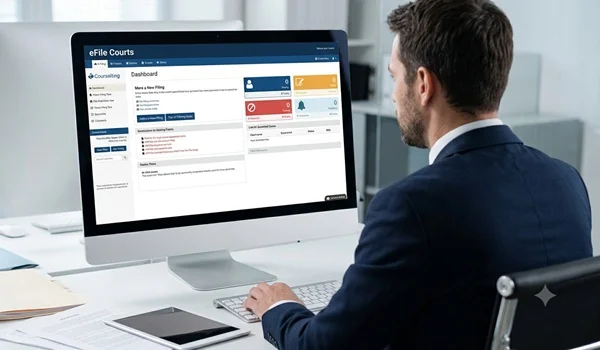
e-Filing
The e-Filing feature is the core service of the eFile Courts platform.
It allows eligible users to:
- Register an account
- File fresh cases online
- Upload petitions and supporting documents
- Submit affidavits
- File interlocutory applications
- Pay applicable court fees electronically (where supported)
- Track scrutiny status
- View registry objections
- Correct filing defects
- Monitor filing progress
To avoid delays, users should ensure that documents comply with the formatting and procedural requirements prescribed by the concerned court, including acceptable file formats, page limits, digital signatures (where required), and mandatory supporting documents.
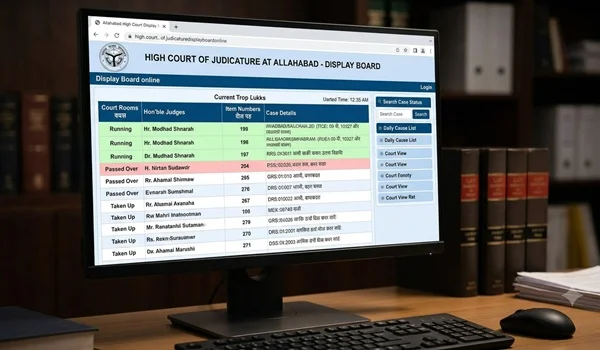
Display Board
After a case is listed, hearing information may appear on the electronic display boards installed within the concerned court premises.
These boards generally display:
- Court Number
- Judge Name
- Current Case
- Next Case
- Hearing Status
- Case Serial Number
Many courts also publish similar information online through their websites or mobile applications.
How to Reach the Court
Since eFile Courts is an online service, users can access it from:
- Home
- Office
- Advocate chambers
- e-Seva Kendras
- Court facilitation centres
If physical attendance is required for hearings or document verification, users should visit the respective High Court, District Court, or other court where the case is pending.
The location will depend on the jurisdiction of the case.
Facilities Available
The eFile Courts ecosystem offers several digital and support facilities.
These include:
- Secure online filing
- Electronic document submission
- Digital case tracking
- Online cause list
- Case status search
- Filing status monitoring
- Virtual hearing support
- Electronic notices
- Online judgments and orders
- Advocate dashboards
- Technical support
- e-Seva Kendras
- Court facilitation centres
- Digital document management
These facilities improve efficiency while reducing paperwork and unnecessary travel.
Frequently Asked Questions (FAQs)
What is eFile Courts?
eFile Courts is an online platform developed under the e-Courts Mission Mode Project that allows eligible users to file court cases and related documents electronically.
Who can use eFile Courts?
Depending on the rules of the concerned court, advocates, government departments, organizations, and, in certain cases, litigants appearing in person can use the platform.
Can I check my case status online?
Yes. Once a case is registered, users can search for its status using the case number, filing number, CNR number, party name, or advocate name.
Is e-Filing available for every court?
Availability depends on the specific High Court, District Court, or other judicial institution. The scope of e-Filing services may differ across jurisdictions.
Can court fees be paid online?
Many courts support electronic payment of court fees and related charges through their e-Filing systems, subject to applicable rules.
What should I do if my filing has objections?
You should review the scrutiny remarks, correct the identified defects, and re-submit the documents within the time allowed by the concerned court.
Are electronically filed documents legally valid?
Yes. Documents filed through the authorized e-Filing system are legally recognized, provided they comply with the applicable procedural rules and requirements.
Do I still need to visit the court after filing online?
It depends on the nature of the case and the court’s directions. While many procedural steps can be completed electronically, personal or advocate appearance may still be required for hearings or specific proceedings.
Conclusion
The eFile Courts platform has transformed the way legal documents are filed and managed in India’s judicial system. By enabling online e-Filing, case status tracking, cause list access, virtual hearing support, and digital document management, it has made court processes faster, more transparent, and more convenient for litigants, advocates, and government departments.
As more courts expand their digital capabilities under the e-Courts Mission Mode Project, eFile Courts continues to play an increasingly important role in improving access to justice. Whether you are filing a fresh case, monitoring an ongoing matter, or accessing court information online, understanding how the platform works can help you navigate legal procedures more efficiently. Always refer to the official website of the concerned court for the latest procedural guidelines, technical requirements, and service availability before submitting documents electronically.