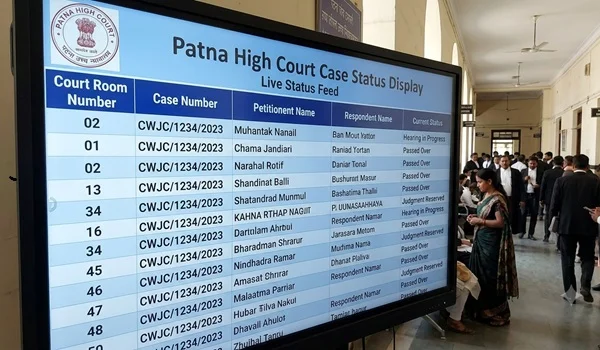
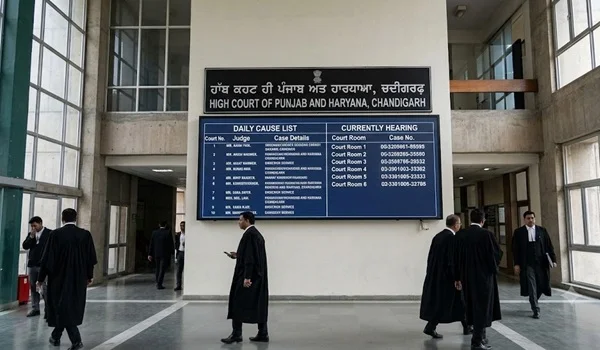
The eCourts Project is one of India’s largest judicial digital initiatives, designed to make court services more accessible, transparent, and efficient. Through the eCourts platform, litigants, advocates, government agencies, and the general public can access a wide range of online judicial services without visiting the court in person.
Today, users can check case status, view cause lists, download judgments and orders, file eligible cases electronically, search cases using CNR numbers, and access various court-related services from anywhere with an internet connection. The platform supports services for District Courts and many High Courts, with additional digital services provided through the judiciary’s online ecosystem.
This guide explains everything you need to know about eCourts Services in India, including available online services, how to use them, search methods, mobile app features, and frequently asked questions.
Quick Information
| Topic | Details |
| Service Name | eCourts Services |
| Managed By | e-Committee, Supreme Court of India |
| Applicable To | District Courts & High Courts (varies by service) |
| Available Through | Web Portal & Mobile App |
| Users | Citizens, Litigants, Advocates & Government Agencies |
| Last Updated | 2026 |
What Is eCourts?
The eCourts Project is a nationwide initiative aimed at digitizing court services across India. It enables courts to provide online access to case information, judicial records, and several citizen-centric services.
The objective is to:
- Improve transparency
- Reduce paperwork
- Increase efficiency
- Provide easy access to judicial information
- Reduce unnecessary visits to court complexes
The project is implemented under the guidance of the e-Committee of the Supreme Court of India.
Who Can Use eCourts Services?
The platform is designed for:
- Litigants
- Advocates
- Law Students
- Researchers
- Government Departments
- Police Authorities
- Businesses
- General Public
Most services are available free of charge.
Major eCourts Services
The platform provides numerous online services.
Case Status
One of the most widely used services.
Users can check:
- Current case status
- Next hearing date
- Previous hearings
- Case stage
- Court number
- Judge details (where available)
CNR Number Search
Every registered case receives a CNR (Case Number Record).
Using the CNR number, users can quickly retrieve:
- Complete case details
- Hearing history
- Orders
- Case progress
Case Number Search
Cases can also be searched using:
- Case Type
- Case Number
- Filing Year
Party Name Search
If the case number is unavailable, users may search using:
- Petitioner Name
- Plaintiff Name
- Respondent Name
- Defendant Name
Availability depends on the court.
Advocate Name Search
Many courts allow users to locate cases associated with a particular advocate.
Cause List
The daily cause list provides:
- Court Number
- Bench Details
- Case Number
- Party Names
- Hearing Schedule
- Item Number
Checking the cause list before visiting the court helps litigants know when their matter is listed.
Daily Orders
Users can view orders passed during court proceedings in many cases.
Judgments
Many courts publish judgments online, allowing users to:
- Read judgments
- Download copies
- Search by case details
e-Filing
Eligible cases may be filed electronically using the e-Filing system, reducing the need for physical paperwork and enabling online submission of documents. Availability depends on court rules and the type of matter.
e-Payment
Some courts support online payment of:
- Court Fees
- Penalties
- Fines
- Other prescribed charges
Availability varies across jurisdictions.
e-Sewa Kendra
e-Sewa Kendras are established in many court complexes to assist litigants with digital court services, including accessing case information and using online judicial systems.
District Courts Portal
The District Courts Portal provides access to:
- Individual District Court websites
- Court information
- Case status
- Cause lists
- Orders
- Judgments
High Court Services
High Courts also provide various online services, including:
- Case Status
- Cause Lists
- Judgments
- Orders
- e-Filing (where available)
National Judicial Data Grid (NJDG)
NJDG provides statistical information relating to pending and disposed cases across participating courts in India, improving transparency and judicial data access.
Virtual Courts
Virtual Courts have been introduced for specified categories of matters in certain jurisdictions, allowing eligible cases to be handled digitally without requiring physical appearance where permitted.
Search Options Available
| Search Method | Available |
| CNR Number | Yes |
| Case Number | Yes |
| Filing Number | Yes |
| Party Name | Yes |
| Advocate Name | Yes |
| FIR Number (where applicable) | Available in supported searches |
| Act / Case Type | Available for supported courts |
Information Available Online
Depending on the court, users may access:
- Case Number
- CNR Number
- Filing Date
- Registration Date
- Petitioner Details
- Respondent Details
- Advocate Details
- Current Stage
- Next Hearing
- Hearing History
- Daily Orders
- Judgments
- Court Number
eCourts Services Mobile App
The official eCourts Services mobile application allows users to access court information directly from their smartphones.
Key features include:
- Case Status
- CNR Search
- Cause List
- Orders
- Judgments
- My Cases
- Court Selection
- Multiple Search Options
The app is available for Android and iOS devices.
Benefits of eCourts Services
The platform offers several advantages.
- Access court information anytime.
- Reduce unnecessary court visits.
- Track hearings online.
- Download judgments and orders.
- Improve transparency.
- Save time for litigants and advocates.
- Easy access to multiple courts.
- Support digital judicial services.
Common Reasons Why Search Results May Not Appear
If a case cannot be located, possible reasons include:
- Incorrect CNR Number
- Wrong Case Number
- Incorrect Filing Year
- Typing Errors
- Case Not Yet Registered
- Searching in the Wrong Court
Tips for Using eCourts Services
- Keep your CNR number safely.
- Verify all case details before searching.
- Check the cause list before attending court.
- Download important orders for your records.
- Use only official judicial platforms for case information.
- Contact the concerned court registry if information appears incorrect.
Frequently Asked Questions
What is eCourts?
eCourts is a digital initiative of the Indian judiciary that provides online access to case information, court records, and various judicial services.
Is eCourts free to use?
Yes. Most services are available free of charge for citizens, litigants, advocates, and other users.
Can I check my case online?
Yes. You can generally search using a CNR number, case number, filing number, party name, advocate name, or other supported search options.
What is a CNR Number?
A CNR (Case Number Record) is a unique identification number assigned to a court case in the eCourts system.
Can I download court orders?
Yes. Many courts publish daily orders and judgments that can be viewed or downloaded online.
Is e-Filing available for every court?
No. e-Filing availability depends on the court, the type of case, and the applicable procedural rules.
Final Thoughts
The eCourts Project has significantly improved access to India’s judicial system by bringing essential court services online. Whether you want to check your case status, view a cause list, download judgments, search using a CNR number, or use digital services like e-Filing, the platform makes judicial information more accessible and transparent.
As more courts continue adopting digital technologies, eCourts Services are expected to play an even greater role in making justice delivery faster, more efficient, and easier for citizens across the country. Always rely on official judicial platforms for the latest case information and court services.